
School websites are harder than they look, and they fail in a specific way. They are usually built to please a board, and boards want the website to express the school's values. So the homepage opens with a mission statement, a photograph of a smiling child in a laboratory, and a message from the head.
Meanwhile the parent who arrived at 10pm on a phone, comparing four schools, wants to know what it costs and when they can visit. And the parent whose child already attends wants the exam datesheet. Neither is served.
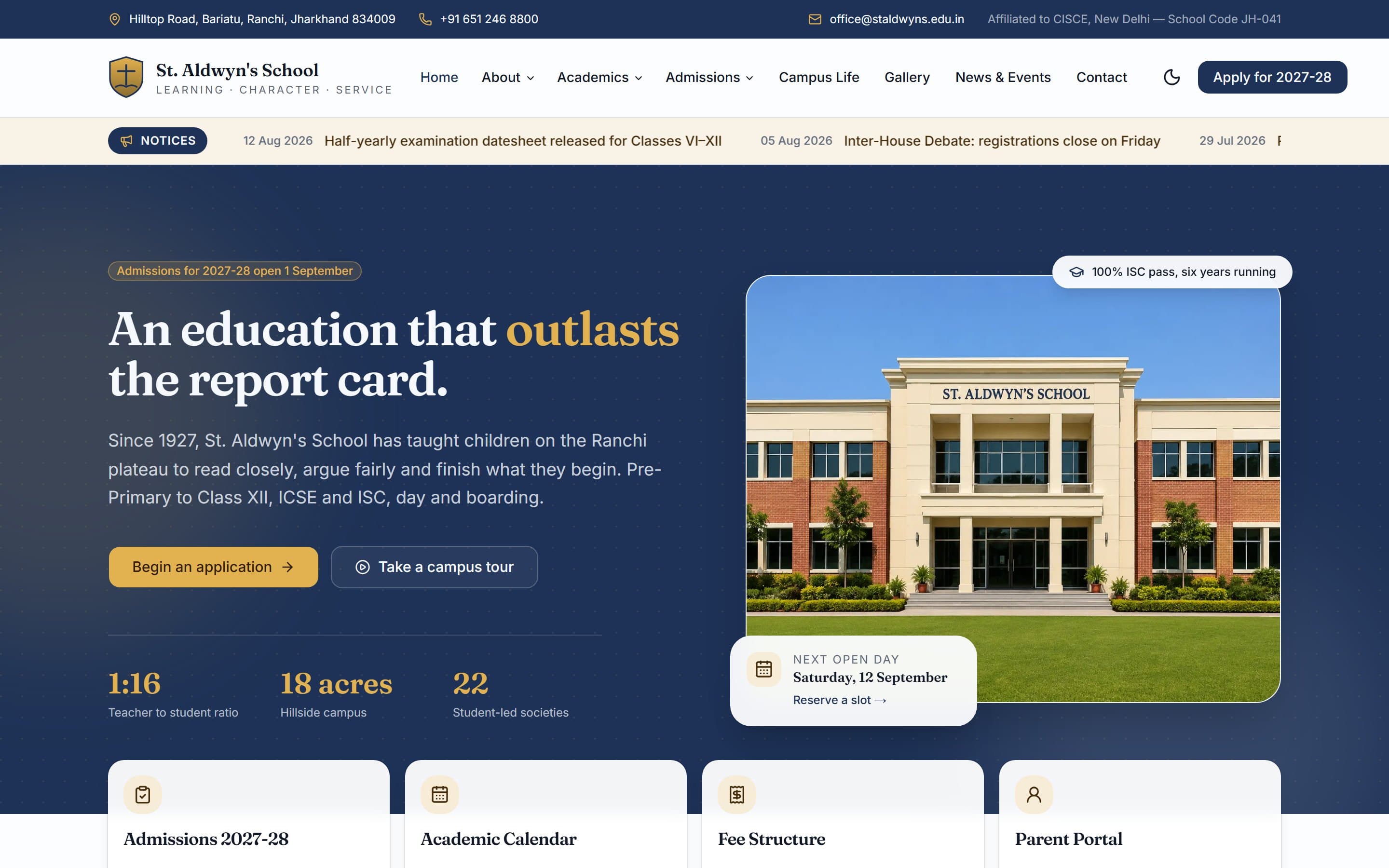
We built St. Aldwyn's School, a demonstration site for an independent day and boarding school, to work through this properly. The core insight is that a school website has three distinct audiences, and pretending otherwise is what breaks it.
Three audiences, three different jobs
1. Prospective parents — the commercial audience
These are the visitors who determine whether the school fills its intake. They are comparing you against three or four other schools, they are usually on a phone, and they are looking for a short list of things: what stages you teach, what it costs, what the results look like, what the campus is like, and how to visit.
They are also, importantly, sceptical. Every school website says it develops well-rounded individuals. None of that helps a parent choose. Specifics do.
2. Current parents — the volume audience
These people visit far more often than prospects do, and they want one of about six things: the calendar, the datesheet, fee payment, bus routes, the parent portal login, and notices. They do not want to be re-sold the school. They want the answer in one click.
Serving them badly has a real cost beyond annoyance: every parent who cannot find the datesheet phones the office, and the office is a fixed staffing cost.
3. Students and alumni — the reputational audience
Results, societies, events, photographs. Little direct commercial value, considerable long-term value. Worth doing well, not worth putting first.
How to structure it
Admissions never leaves the screen
On the demo build, an "Apply for 2027-28" button sits in the header at all times. The hero leads with an application call to action, and beside it the date of the next open day with a link to reserve a slot.
The open day detail matters more than it appears. Booking a visit is a far smaller commitment than starting an application, and for most schools the campus visit is where the decision is actually made. Making that the easy first step converts better than pushing straight to a form.
A notices ticker for current parents
Directly under the header on the demo, dated notices scroll past: admission forms open on 1 September, the half-yearly datesheet is released, inter-house debate registrations close Friday, revised bus routes for two sectors, PTM for Classes IX and XI.
This is the highest-traffic feature on a real school site and it is routinely buried three clicks deep inside a PDF. Putting it in the first screen serves the biggest audience by volume without spending any of the space that prospects need, because prospects simply scroll past it.
Four quick actions, not a maze
Immediately below the fold sit four cards: Admissions, Academic Calendar, Fee Structure, Parent Portal. Between them they cover the large majority of all visits to a school website. Everything else can live in the navigation.
Specifics instead of slogans
The demo states a 1:16 teacher-to-student ratio, an 18-acre campus, 22 student-led societies, and a 100 percent ISC pass rate six years running. Those are checkable, comparable facts. A parent weighing four schools can do something with them. "We nurture every child's potential" gives them nothing to compare.
If your results are strong, publish them. If your class sizes are small, give the number. If your campus is large, say how large.
Let the campus sell itself
For boarding especially, parents are choosing a place their child will live. The demo shows facilities as a real grid — libraries, science laboratories, computing and robotics, sports complex, swimming pool, performing arts — with photography, a gallery, and a virtual tour option.
Photographs of your actual buildings and actual children beat stock imagery every time, and parents can tell the difference instantly.
The things schools consistently get wrong
- Fees hidden behind an enquiry form. Parents will find out eventually. Making them ask filters out good families and irritates everyone else. Publish a fee structure, even a range.
- Everything as a PDF. Datesheets, calendars, circulars, prospectuses. Unreadable on a phone, invisible to search, impossible to update quickly.
- A homepage message from the head, above everything else. It belongs on the About page.
- News that stops two years ago. An abandoned news section signals a school that has stopped paying attention.
- No mobile layout worth the name. Most prospective-parent research happens on a phone, in the evening.
- An inaccessible site. Schools have a stronger obligation here than most organisations, and in several jurisdictions a legal one. Real keyboard navigation, proper contrast and alt text are not optional.
What it costs and how long it takes
A school website of the kind described here is a Business build for us: from around $750, typically two to four weeks. That covers the structure, the admissions path, notices, calendar, gallery, facilities and a mobile-first layout.
What pushes it higher is integration — a parent portal tied to your management system, online fee payment, or an application form that writes into an existing admissions database. Those are worth scoping separately and honestly, because they are where school web projects usually overrun.
Look at the build
The demonstration site is live and complete: St. Aldwyn's School. Open it on a phone and try to do what a prospective parent would do — find the fees, find the next open day, and start an application.
Then try the same three things on your own school's site. If it takes longer, tell us about your school and we will send a fixed written quote after a free call.
